MyPost Social is an AI social media post generator for small businesses. Give it your website, your customer reviews, and your current offers. It writes posts about your business and publishes them to Facebook and LinkedIn automatically, every day.
Most business owners know they should post consistently. They just never do. Here's why it keeps falling apart.
Fresh ideas every week that actually sound like your business. It's a full-time job you don't have bandwidth for. Most posts get written once and then abandoned.
A social media manager runs $500–$2,000/month. Freelancers churn. And neither one knows your business like you do. Or cares as much about getting it right.
Wrong services, fake stats, promises you never made. Generic tools fill gaps with guesswork. That destroys trust with your customers the moment they notice.
The algorithm rewards consistency above everything else. Two weeks on, three weeks off teaches Facebook to stop showing your page to anyone, even people who already follow you.
A few minutes of setup, then MyPost Social runs on its own. You decide how often it posts and when. It does the writing and the posting.
Log in with Facebook and pick your Page. That's it. Connect LinkedIn the same way if you want posts there too.
Paste your website URL. MyPost Social reads it and learns your services, location, and how you talk to customers. You can also add details by hand.
Paste in real customer reviews and any current specials. Reviews become Success Story posts. Offers become Promotion posts.
Choose how many posts a day, which days, and the hours they can go out. Switch off any post types you don't want.
Hit Start. MyPost Social writes each post fresh from your Knowledge Base, adds an image if you want one, and publishes it on time.
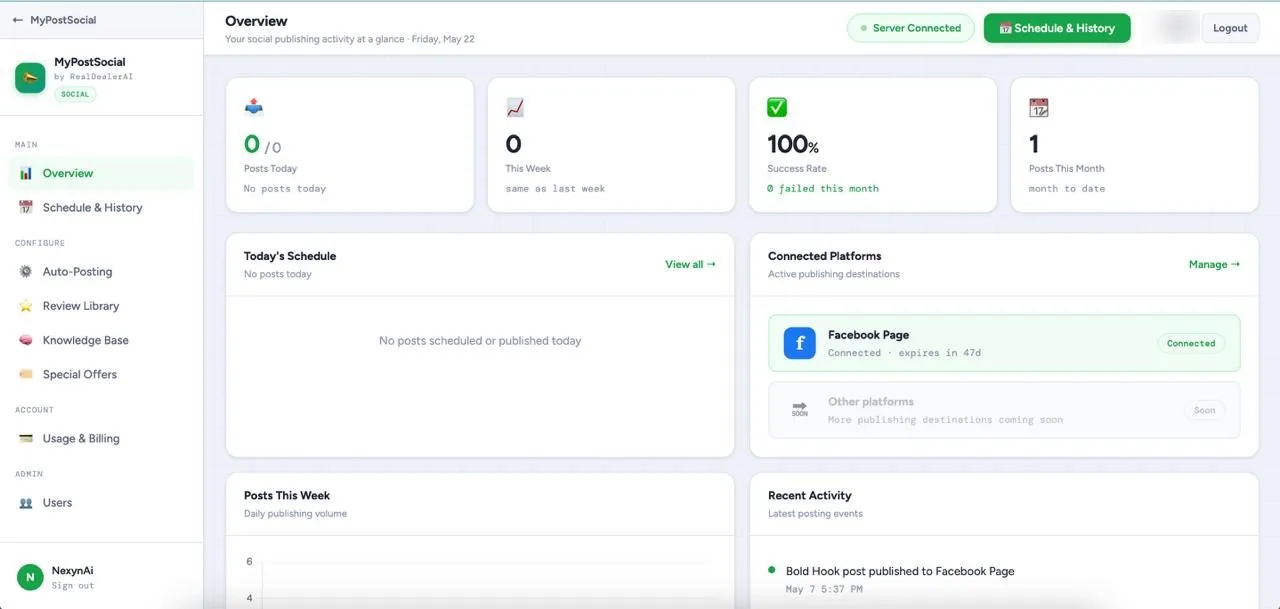
The dashboard shows what's gone out and what's next. Hit Post One Now to send one early, or Stop to pause.

FIG. 2: Auto-Posting. Set it once.
MyPost Social doesn't guess. It draws from sources you control: your business, your customers, your offers, your competitors, and real-world stats relevant to your field. So every post sounds like your business, not a template.
Paste your website URL and MyPost Social reads your site, type it out yourself, or paste it in. Add to it any time. It learns your services, location, tone, and what makes you different. Every entry you save is handed to the AI in full for every single post it writes, nothing gets left out or guessed at, so keep entries short and focused for the sharpest results.
Add your reviews as you collect them. They become Success Story posts: real social proof from the customers you've already made happy.
Add a special offer with an expiry date. It feeds into Promotion posts until it expires, then stops automatically. No outdated deals going live.
Name a competitor and MyPost Social scans their website to identify where your business stands apart. That contrast feeds directly into posts that position you clearly against the alternatives.
For Pro Tips and Industry Insights, MyPost Social pulls verifiable stats from the web that are relevant to your field, so your posts carry weight, not guesswork.

FIG. 3: The Knowledge Base

FIG. 4: Posted to Facebook
MyPost Social rotates through 8 proven formats so your feed stays fresh. Each type drives a different kind of engagement. Switch off any you don't want.
A scroll-stopping statement that grabs attention in the first two seconds. Leads with the most compelling thing about your business.
Speaks directly to a problem your customers face, and positions your business as the solution, specific to your services, not generic.
Expert advice from your field, building credibility and trust with people who haven't hired you yet.
Turns a real customer review into compelling social proof. Built from your actual reviews, so the praise is real and specific.
Highlights your current offers and drives action. Runs automatically until your offer expires, then stops on its own.
Positions you as a knowledgeable leader in your space, without you having to research or write a word.
Asks your audience a question to spark comments and interaction, the signal the algorithm uses to boost your reach.
Shows the transformation your work delivers, a clear visual or story contrast that proves results instead of just claiming them.
← drag to browse the drawer →
Each post is 90–120 words, punchy, readable, and built for social. Nothing bloated. Nothing generic.
Generic AI tools generate generic content. MyPost Social is built from what your business actually does, says, and sells. Not from a prompt and a guess.
It reads your website, your reviews, and your current offers, and writes from those. Posts mention the services you actually offer and the customers you actually have.
You choose how often it posts, on which days, at what hours, and which post types it uses. Change any of it, or hit Stop, whenever you want.
It keeps track of what it's already posted and rotates through 8 post types, so your Page doesn't say the same thing twice.
Name your competitors and it reads their websites to find where you stand apart. Then it works that edge into your posts, so people see why they should pick you.
MyPost Social posts for you every day without an agency retainer, a content hire, or your own evenings. Set it up once and it keeps going.
If your business has a Facebook Page, MyPost Social can start posting for you today. No content team. No social media expertise. A few minutes of setup and it runs.
Everything owners ask before their first demo.
MyPost Social is an AI Facebook post generator and automation tool for small businesses. It writes posts from your real website, reviews, and offers and publishes them to your Facebook Page automatically, on the days and hours you choose. It can post to LinkedIn too.
MyPost Social builds a Knowledge Base from your website, your real customer reviews, and your active promotions. Every post is generated from that information, so it reflects your actual services, tone, and offers instead of generic AI guesses.
No. MyPost Social only writes from sources you've added. If a source is missing, such as no reviews or no active offers, that post type is skipped entirely instead of being filled in with invented content.
No. Once you start auto-posting, MyPost Social writes and publishes posts on its own, on the days and hours you set. The dashboard shows what's been posted and what's next, and you can post one early, change your settings, or stop it anytime.
No. If your business has a Facebook Page, MyPost Social can start writing posts for it today. No content team or social media expertise is required. Setup takes a few minutes and it runs from there.
Facebook and LinkedIn. You connect each one by logging in from your dashboard. No calls or setup help needed.
Pricing is discussed on a short, free demo call so it can be tailored to your business. Book a demo to see MyPost Social with your own website and get current pricing.
See it in action on a quick 15-minute demo. We'll show you how it works with your real business.